Python Flow Control with If Statements

Python Flow Control with If Statements is part of the series — Zero to Network Automation. In this post, we’ll explore Flow Control in Python code and how it relates to If statements.
Python code doesn’t run from top to bottom, sequentially. It’s not a list of things the code goes through like a grocery list.
We create blocks of code and evaluate to specific conditions. Based on those conditions we can run another block of code.
Flow control is how we decide which code Python runs.
Flow Control
You’ve likely ran into flow control at your workplace. On paper, it can look like a flowchart. There are a series of tasks and based on the condition evaluated, you are directed towards the next task.
It rarely looks like a straight line from start to finish.
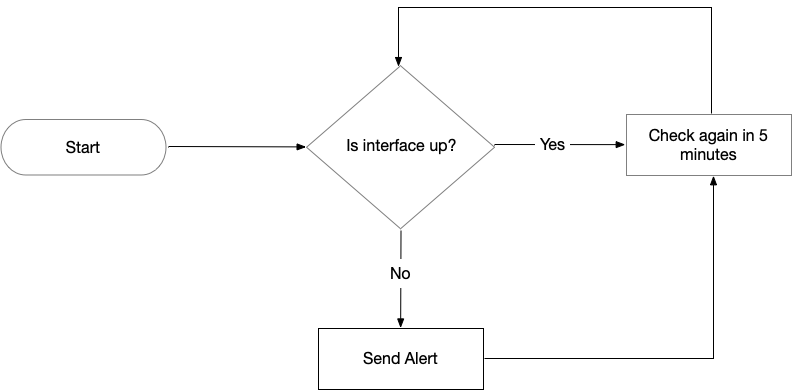
You can tell that we have a boolean value of yes or no from the example above.
If we evaluate to yes, then we execute the next step. If we evaluate to no, then we perform a different step.
It’s a simple: Is the interface up? Yes or No? Or possibly simplified to Up or Down.
Components
Flow Control starts with a condition and is followed by a block of code.
The condition is where we perform an evaluation. Based on the result of that condition, we execute whatever is in the block of code.
The block(s) of code is indented after the evaluation. It is possible to next blocks within blocks as long as you maintain the correct indentation. The evaluation will end with a colon, :, and on the next line will be the indented block of code.
Comparison Operators
In Python, we would compare the Interface being Up to Yes or No.
That means using the Equal to operator, ==.
interface == "Up"
interface == "Down"
Here are the different comparison operators:
| Operator | Definition | Example |
|---|---|---|
| == | Equal to | interface == up |
| != | Not equal to | interface != down |
| < | Less than | 800 Mbps < 1000 Mbps |
| > | Greater than | 900 Mbps > 800 Mbps |
| <= | Less than or equal to | 950 Mbps <= 1000 Mbps |
| >= | Greater than or equal to | 1200 Mbps >= 1000 Mbps |
Comparison operators
if Statement
The if statement contains a clause, a block of code, that Python executes based on a condition that is met.
Put simply: If this condition is True, then execute this block of code.
The components of an if statement are:
- the if keyword
- A condition
- First line ends in a colon
- Next line is an indented block of code
An example looks like:
if interface == "Up":
  print("Interface is operational")
But what happens if the condition is not True?
else Clause
The else clause is executed when the if statement’s condition results in False.
Put simply: If this condition is True, then execute this block of code. Or else, execute this other block of code.
The components are similar to the if statement. Else consists of:
- the else keyword
- A colon at the end of the line
- An indented block of code
We’ll take the previous example of our interface:
if interface == "Up":
  print("Interface is operational")
else:
  print("Interface is non-operational")
elif Clause
What if there are other clauses to execute code on? Life isn’t as simple as having two options. There might be other conditions that could be met.
The elif statement is an else if statement that follows the initial if statement.
The components are:
- the elif keyword
- A condition
- Line ends in a colon
- Following line is indented with a block of code
We’ll enhance the previous interface example:
if interface == "Up":
  print("Interface is operational")
elif utilization > 80:
  print("Warning — High utilizaton")
elif error_rate > 0.05:
  print("Warning — High error rate")
else:
  print("Interface is non-operational")
In the example above, I used a comparison operator to evaluate whether there is a high utilization of an interface or high error rate.
Thoughts
The examples I’ve provided above are simplified. In reality, we’ll query these interfaces to obtain the status. What receive from our network device will be evaluated through our if, elif, else statements.
The if statement looks to be used quite a bit. Best to get familiar with it as much as possible and understand the syntax.